





QA teams are more critical than ever but also more pressed for time. With faster development cycles and growing complexity, testers must keep speed and quality in balance. Yet test case creation is still slow, manual, and repetitive - consuming time, introducing errors, and risking missed scenarios.
It’s time for something better.
Introducing AI-Powered Test Case Generation in Xray
A faster, smarter way to turn your requirements into structured, accurate test cases — with full transparency and control. Whether you're working with Manual tests or Cucumber (BDD) format, this saves hours of writing and helps you keep pace with change.
Why We Built AI Test Case Generation in Xray
While many tools offer AI test generation, most operate black boxes - spitting out full tests with little context. They generate full test cases instantly, often missing critical context, leaving testers to rewrite or clean up what should’ve saved them time.
We believe there’s a better way.
Xray’s approach positions AI as a collaborator, not a replacement. Our “Review, Edit & Select” step ensures every suggestion passes through the most critical quality filter: the human one.
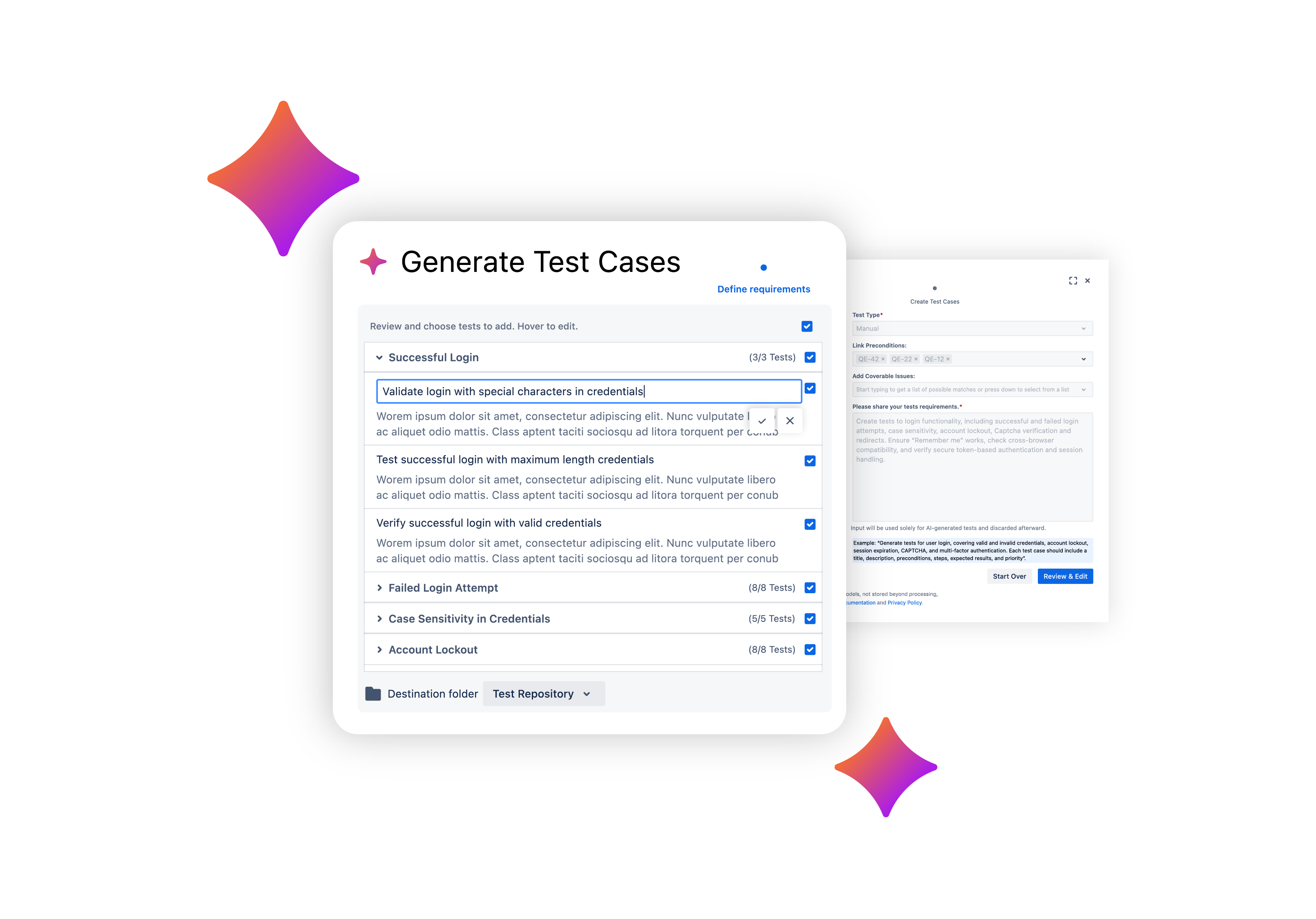
How AI Test Case Generation works in Xray
When enabled, Xray's AI Test Generation allows you to:
- Select one or more requirements, preconditions, or coverable issues
- Instantly preview AI-suggested test titles and descriptions
- Review, edit, or discard suggestions before generating full tests
- Choose Manual or Cucumber format to match your workflow
The result: test cases that are faster to produce, higher in quality, and always aligned with your real needs.
What makes Xray’s AI Test Case Generation different
✅ AI assistance, not automation
You’re still in control. Every suggestion passes through a real person before becoming a test.
✅ Speed + accuracy
Generate more tests in less time, without sacrificing alignment to system behavior.
✅ Supports real QA workflows
Manual and BDD-style test formats
✅ Built with privacy in mind
All data is encrypted in transit and never stored or reused for training.
✅ Privacy-first design
All requirement data is encrypted in transit and never stored or reused by the LLM.
✅ Scalable and secure
Control who can use AI features with Jira permission schemes — ideal for teams of any size.
Who's it for
This capability is ideal for:
- QA Engineers and Testers looking to eliminate repetitive work
- QA Leads aiming to scale coverage across teams
- Agile teams that need to create and update tests quickly
AI Test Case Generation in Xray (Open Beta)
Xray’s AI Test Case Generation is now available in Open Beta — meaning all Xray Cloud users can access it today.
You can now experience how AI can help you work faster, stay accurate, and remain in control — directly within your Xray Cloud instance.
How to enable AI in Xray
Prerequisites:
-
Xray installed on your Jira Cloud instance
-
Jira Admin privileges
To enable:
-
Go to Administration (⚙️) → Apps → Features
-
Open the Xray Features screen and find AI Settings
-
Click Configure to manage permissions by user group
-
Use the toggle to enable or disable the feature
This is just the beginning — we can’t wait for you to explore it and share your feedback.
Xray's AI Features — FAQs
What AI features does Xray currently include?
Xray integrates three AI-powered capabilities built on Sembi IQ to enhance every stage of the testing lifecycle:
-
AI Test Case Generation (available in Standard, Advanced, and Enterprise) — automatically produces draft test cases from written requirements in just a few seconds.
-
AI Test Model Generation (exclusive to Enterprise) — converts natural-language requirements into structured, visual models to strengthen coverage and traceability.
Together, these AI features enable teams to develop a more connected and intelligent AI testing strategy, improving both speed and precision without sacrificing oversight.
Are Xray’s AI features meant to replace testers?
Not at all. Xray’s AI works as a support system, helping testers focus on critical thinking instead of repetitive setup work. Every suggestion AI provides can be reviewed, adjusted, or expanded by testers — ensuring that human insight remains the foundation of every testing decision.
How does Xray ensure security when using AI features?
All AI operations in Xray are handled securely within your Jira instance. Data never leaves your environment, isn’t stored externally, and isn’t used for model training. Every interaction is encrypted in transit, and AI features are completely optional, giving admins full control over when and how they’re enabled.
How can AI features be enabled in Xray?
To activate AI within Xray Enterprise, administrators can head to Administration → Apps → Features → AI Settings. From there, they can configure access permissions, manage visibility, and decide which AI capabilities are available to each team or project.
What makes Xray’s approach to AI unique?
Xray’s AI was purpose-built for testing — not adapted from generic automation tools. Powered by Sembi IQ, it delivers context-aware, explainable, and secure intelligence that integrates directly into Jira workflows. This makes it a trusted partner for QA teams looking to scale quality without compromising human control or data privacy.