


Writing Tests from Requirements often starts with the same decision: how many scenarios does this change actually need?
The number of Tests needed for a Requirement depends on the behavior it describes. A small change may require only a few Tests, while a feature with several acceptance criteria, user roles, and possible outcomes may need a broader set.
AI Test Case Generation in Xray now lets testers account for that difference before generation begins. Users can set the maximum number of Tests they want Xray to generate, up to 60, giving them more control over the size of the suggested set they’ll review.
What changed in AI Test Case Generation
AI Test Case Generation already allowed testers to use Requirements, Preconditions, or other coverable issues as the source for new Tests. Xray analyzes the selected content and suggests Test titles and descriptions, which testers can review before deciding what should be created.
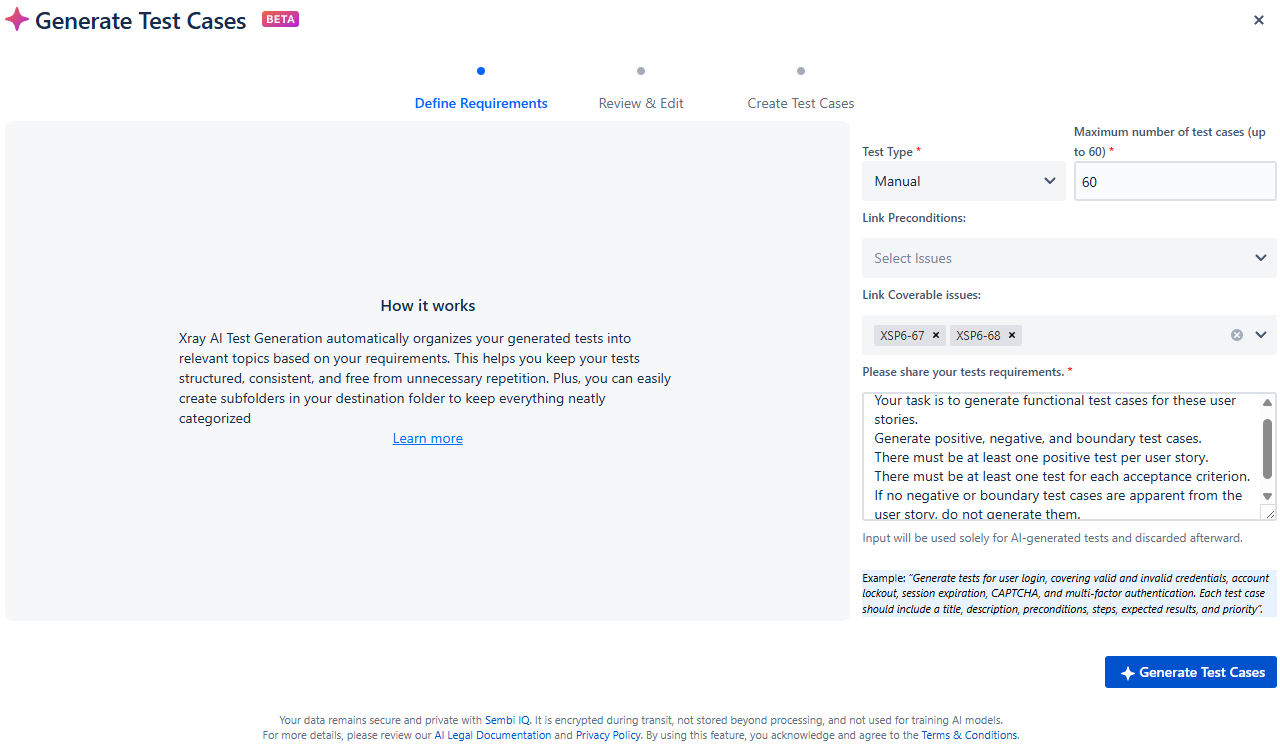
The updated workflow adds the option to define the maximum number of Tests generated in each request.
Previously, users couldn’t directly control the size of the generated set. With the new setting, they can request a smaller number for a focused Requirement or allow more suggestions when the selected content describes several paths and conditions.
The selected value is a maximum, not a fixed output or coverage target. Setting the limit to 30, for example, doesn’t mean Xray will always produce exactly 30 suggestions, nor does it mean the Requirement needs 30 Tests.
How the updated workflow works
The process begins from a Requirement, Precondition, or another Jira issue configured as coverable.
Testers can then:
- Select one or more source issues.
- Add instructions for the Tests they want to generate.
- Choose Manual or Cucumber as the Test Type.
- Set the maximum number of Tests, up to 60.
- Generate the Test suggestions.
- Review and edit the suggested titles and descriptions.
- Select the suggestions that should become Tests and discard the rest.
Xray doesn’t automatically create every suggestion. Testers decide which results match the intended behavior and whether any changes are required before Test creation.
This keeps human review within the generation process. The AI feature provides an initial set of suggestions, while the tester determines whether those suggestions are accurate, relevant, and useful.
Choose a limit that matches the Requirement
Using the same maximum for every request can create unnecessary review work or restrict the range of suggestions available for a larger feature.
A focused Requirement, such as a small validation change, may need only a short set of Tests. Choosing a lower maximum keeps the output closer to the scope of the change and makes the generated suggestions quicker to assess.
A Requirement containing several acceptance criteria may benefit from a higher maximum. A permissions feature, for example, could include different user roles, permitted actions, restricted actions, error messages, and attempts to access protected functions. Allowing more suggestions gives Xray room to interpret those different paths.
Generating dozens of Tests for a short Requirement can produce repeated or marginal variations that take time to review without adding useful coverage.
More generated Tests don’t guarantee better coverage
The quality of the selected source content also affects the usefulness of the output. A Requirement with clear acceptance criteria, conditions, user roles, and expected results gives AI Test Case Generation more context than a short description with missing information.
Before generating Tests, teams should check whether the selected content explains:
- What the user or system should do.
- Which conditions affect the behavior.
- What outcome is expected.
- Which restrictions or failure states apply.
- Whether any Preconditions provide necessary context.
Clearer source content supports more relevant suggestions, but the generated set still needs to be checked against product behavior and existing test coverage.
Review each suggestion before creating Tests
AI Test Case Generation is powered by Sembi IQ and follows a human-in-the-loop workflow. It reduces the initial writing required to turn Requirement content into draft Tests, but it doesn’t determine whether the resulting coverage is complete.
Testers remain responsible for checking whether each suggestion:
- Matches the Requirement and its acceptance criteria.
- Represents valid product behavior.
- Adds coverage that isn’t already provided by another Test.
- Contains enough information for later execution.
- Should be edited, created, or discarded.
This review becomes particularly relevant when a Requirement depends on information that isn’t fully documented in Jira. AI Test Case Generation works from the available context, while the tester applies knowledge of the product, users, risks, and domain-specific rules. Setting the maximum number of Tests improves control over the generated output without changing that responsibility.
AI works best in testing when it reduces repetitive work without removing human judgment. Features such as AI Test Case Generation give testers a structured starting point while keeping the decisions about coverage, relevance, and quality in their hands.
FAQ: AI Test Case Generation
What is AI Test Case Generation in Xray?
AI Test Case Generation is an Xray Cloud feature, powered by Sembi IQ, that uses Requirements, Preconditions, or other coverable Jira issues to suggest Test titles and descriptions. Testers review the suggestions and decide which ones should become Tests.
What is the maximum number of Tests AI Test Case Generation can generate?
Users can set a maximum of up to 60 Tests for each generation request. The selected number defines the upper limit for the output. Xray may generate fewer Tests based on the source content and instructions provided.
Does selecting a higher maximum improve test coverage?
Not necessarily. A higher maximum gives Xray room to produce more suggestions, but it doesn’t confirm that every relevant behavior, risk, or boundary condition has been covered. Testers must review the generated Tests against the Requirements and existing coverage.
Can testers edit AI-generated Tests before creating them?
Yes. Testers can review and edit the suggested Test titles and descriptions, select the suggestions they want to create, and discard the remaining results.
Which Test Types does AI Test Case Generation support?
AI Test Case Generation supports Manual and Cucumber Test Types. Users choose the required Test Type during the generation workflow.
Do users need Jira Admin permissions to use AI Test Case Generation?
No. A Jira Admin must configure access to Xray's AI Hub, but individual users don’t need Jira Admin permissions to generate Tests.