



AI is becoming part of every stage of the testing lifecycle. Teams are using it to analyze requirements, design test cases, generate automation scripts, and accelerate execution activities that previously required significant manual effort.
Within Xray already helps transform Jira Requirements into actionable Tests with AI Test Case Generation. Once those Tests have been reviewed and validated, Xray can generate automation scripts in frameworks such as Selenium and Playwright, using languages including Java and Python.
Yet one area continues to create challenges for QA teams: manual test execution.
Even in organizations with mature automation strategies, a large percentage of test cases remain manual, where new functionality, evolving user journeys, and scenarios that change frequently are often difficult to justify automating immediately. As release deadlines approach, testing teams face increasing execution workloads, limited capacity, and growing pressure to maintain coverage.
The Lynqa-Xray integration addresses this challenge directly inside Jira.
Why manual test execution remains a challenge
Every QA team eventually reaches the same bottleneck: there is more testing to execute than available time and resources.
Manual execution depends entirely on human capacity, since, during release periods, execution demand increases significantly, but testing teams rarely scale at the same pace.
This creates several familiar challenges:
- Limited resources and fixed execution capacity.
- Difficulty absorbing peak workloads before releases.
- Repetitive execution activities that increase the likelihood of human error.
- Inconsistent evidence collection across teams.
- Less time available for exploratory testing and deeper quality analysis.
Traditional automation helps for stable regression scenarios, but it is not always the right solution for rapidly evolving functionality. New features often change every sprint. User journeys are refined. Requirements continue to evolve. Building and maintaining automation for these scenarios can quickly become expensive.
As a result, many organizations find themselves caught between manual execution that does not scale and automation that is not yet practical.
Extending AI into test execution
Lynqa brings Agentic AI execution to existing Xray workflows.
Instead of requiring teams to build scripts, maintain automation frameworks, or redesign their processes, Lynqa works with existing Manual and Gherkin Tests. The platform reads natural-language instructions, interacts with the application, validates expected outcomes, and captures evidence throughout execution.
When unexpected behaviour occurs, Lynqa identifies where the issue happened and provides supporting evidence for review.
Execution results remain under human supervision. QA teams review outcomes, validate findings, and decide whether results should be accepted before execution evidence is stored in Xray.
This approach allows organizations to increase execution capacity without losing visibility or control.
Key benefits include:
- AI-powered execution directly from Xray.
- Support for existing Manual and Gherkin Tests.
- No automation code to build or maintain.
- Parallel execution to absorb peak workloads.
- Structured evidence captured automatically.
- Full traceability and reporting inside Xray.
Two AI approaches for modern testing teams
The combination of Xray and Lynqa introduces two complementary approaches to AI-assisted testing.
Agentic AI test execution with Lynqa
Agentic AI execution focuses on running existing Tests automatically without requiring scripting. This approach is particularly valuable for in-sprint validation, rapidly evolving functionality, and scenarios that are not yet suitable for long-term automation.
Teams can execute Tests immediately, gather evidence, and make release decisions without investing time in automation development.
AI-assisted script generation with Xray
Once a scenario becomes stable, Xray can generate Automation Scripts directly from validated Test cases. Automation engineers can generate scripts in Selenium or Playwright using languages such as Java and Python, creating assets suitable for long-term regression testing and CI/CD pipelines.
Together, these approaches support different stages of the testing lifecycle. Teams can start with AI-assisted execution during active development and transition mature scenarios into automated regression suites once they stabilize.
How the Xray-Lynqa integration works
The integration is designed to fit naturally into existing Xray workflows.
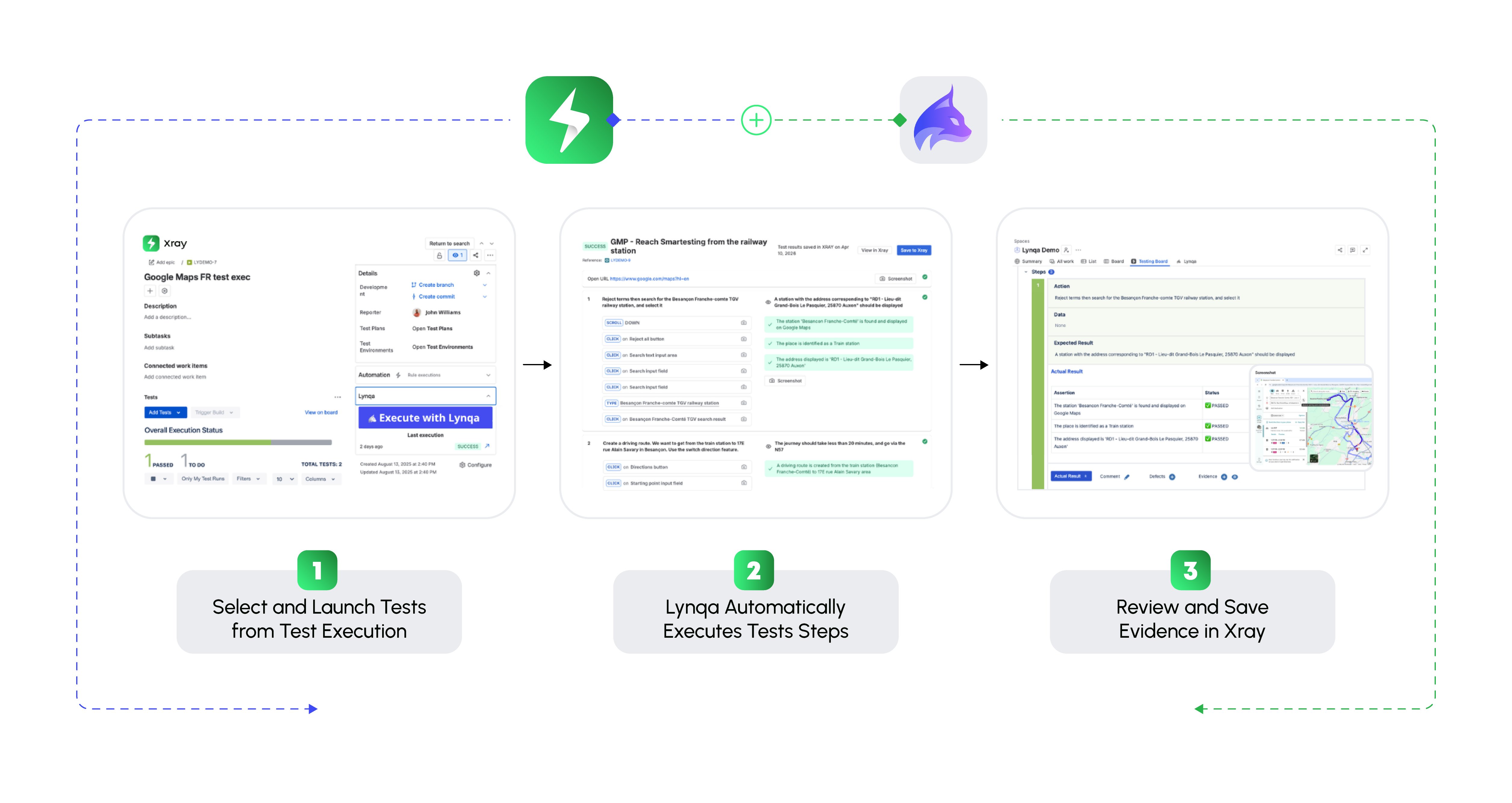
Step 1: Select Tests in Xray
Teams begin by selecting Manual or Gherkin Test cases directly from Xray Test Executions.
Tests can be executed individually or in batches without modification.
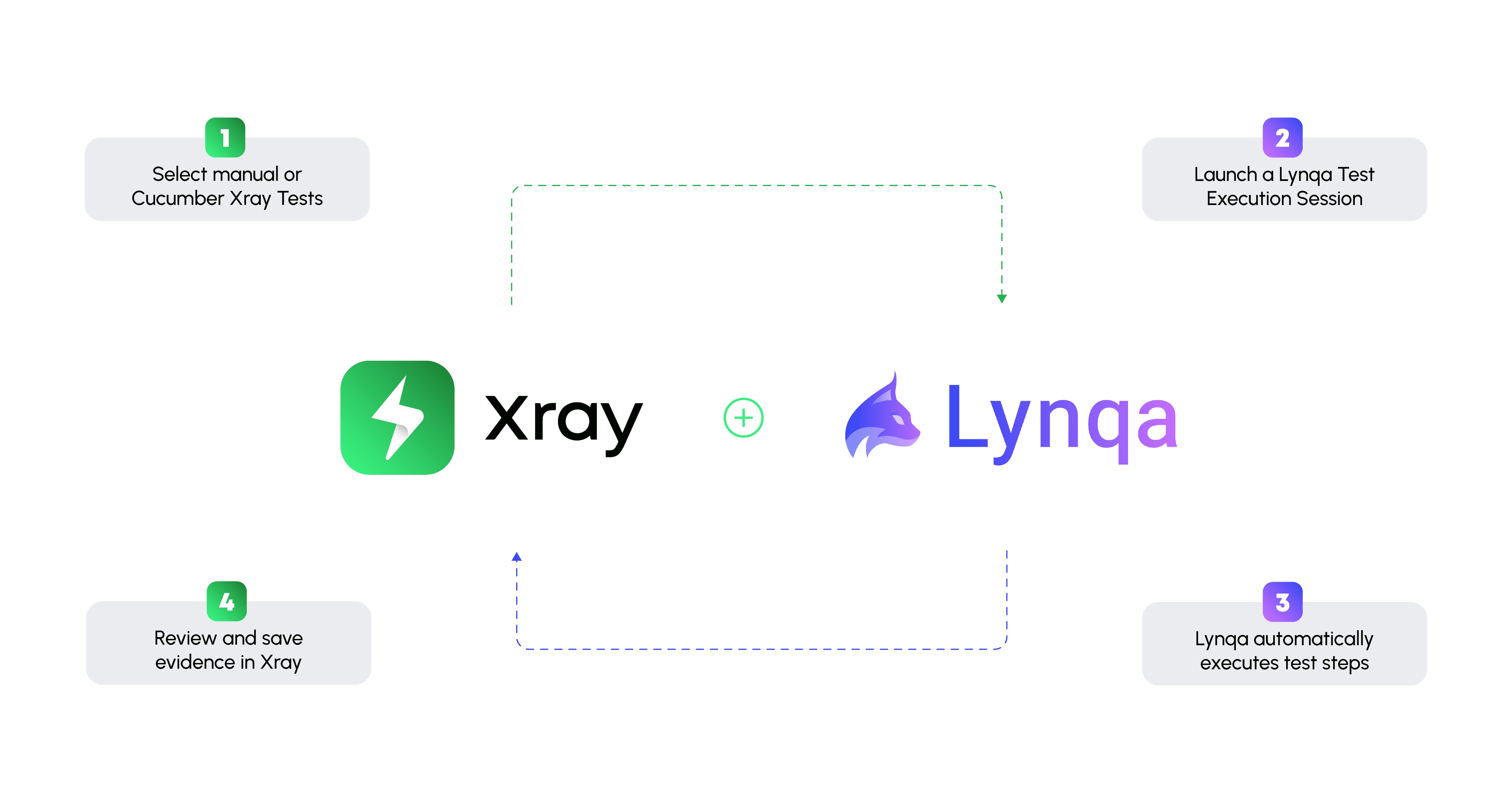
Step 2: Launch a Lynqa execution session
After selecting the target environment, Lynqa reads the natural-language instructions contained in each test case.
The platform performs the required actions, navigates the application, enters data, and validates expected outcomes according to the defined steps.
Step 3: Capture evidence automatically
Throughout execution, Lynqa documents performed actions, verifies expected results, and captures screenshots.
The result is consistent, traceable execution evidence without requiring manual documentation from testers.
Step 4: Review results and make decisions
Execution reports are reviewed directly in Jira.
If unexpected behavior occurs, Lynqa highlights the issue and provides supporting evidence. QA teams remain responsible for validating outcomes and determining the final execution status.
Once approved, execution results and evidence can be saved directly into Xray.
Step 5: Leverage Xray reporting capabilities
After execution is complete, Xray provides visibility into requirement coverage, execution progress, defect traceability, and release readiness.
The execution data generated through Lynqa becomes part of existing Xray dashboards and reports, helping stakeholders understand product quality in real time.
Extending the testing lifecycle with Xray and Lynqa
Testing teams are expected to deliver broader coverage, faster feedback, stronger evidence, and greater confidence in release decisions.
Lynqa and Xray help address those demands by extending AI beyond test design and automation generation into test execution itself. Existing Manual and Gherkin Tests can be executed automatically, execution evidence is captured consistently, and results remain connected to requirements, coverage, defects, and releases inside Jira.
The objective is not to replace testers, but to reduce the time spent on repetitive execution activities so teams can focus on investigation, analysis, and decision-making. AI handles execution, and teams remain responsible for the outcome.
Learn more about Agentic AI Test Execution inside Jira with Xray and Lynqa.